The live event agenda, and the nudge 15 minutes before
The agenda PDF is out of date before it gets printed. We shipped the portal agenda: rooms, filters, and a nudge on the phone 15 minutes before each talk.
The agenda PDF is one of the great lies of the events industry. It gets designed two weeks ahead, it gets printed, and it goes out of date the Tuesday before, when a speaker says they can't make it. On the day of the event there are three versions going around and nobody knows which one is the good one.
And even when it's right, it's useless. Nobody opens a nine-page PDF on a phone, standing in a hallway, to find out which talk starts now.
The pain: the agenda exists but doesn't arrive in time
For the organizer, the agenda is the document that gets remade the most times and distributed the worst. Every change means re-editing, re-exporting, re-sending and hoping people open the new message instead of the old one. And when it matters, the talk that took so much work to land starts with the room half full — not because nobody was interested, but because people were at the coffee stand with no idea it had begun.
For the attendee, the problem is simpler and more frustrating: they miss the talks they wanted to see. Not out of disinterest. Because they were in the middle of a conversation, because they lost track of time, because the printed program stayed on the chair. They found out at 15:20 that the 15:00 talk was the one that mattered to them.
The value of an agenda isn't in the information. It's in the information arriving at the exact moment it's useful.
What we shipped: the portal's live agenda
The agenda lives inside the event portal, which opens in the phone’s browser: there is nothing to download, and no app store to go through. When the organizer changes a time, it changed for everyone, right then. There are no versions.
And it's built to be used standing up, with one hand, in a hallway:
- Search by talk, speaker or room.
- Filters by day, for events that run longer than one.
- Filters by room, each one with its own color. The colors are assigned in the order the rooms appear, so the main room always takes the first color and reading it becomes muscle memory after the second time.
- A speaker filter, which only shows up when it makes sense: with fewer than two speakers it isn't needed, and with more than twenty the row of chips becomes unmanageable on a phone. That's where search takes over.
- Three views: all talks, the AI-built agenda, and My agenda, your own.
Each talk opens into a card with its description, its speakers, its room and its flyer, if the organizer uploaded one.
The detail nobody praises
Room colours aren't picked: they're assigned in the order the rooms first appear in the programme. The main stage, which almost always opens the day, always takes the first colour. It sounds trivial, and it's what means that by the second time you open the agenda you've stopped reading room names — the colour is enough.
And the blocks that aren't talks — the coffee break, lunch, registration — stay out of the room filter. They're on the agenda because they're part of the day, but they aren't a room where things happen, and putting them in the filter only adds noise.
The nudge that fills the rooms: 15 minutes before
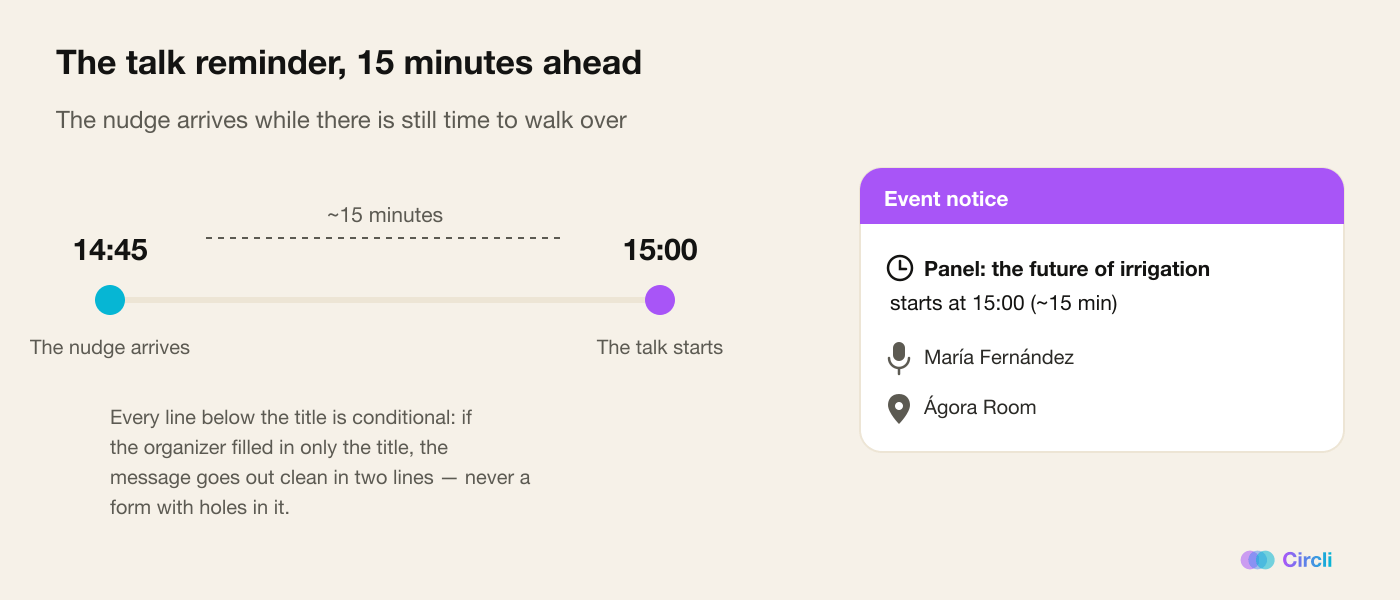
This is the feature with the biggest impact on how full the rooms are, and it's one line long: a nudge lands on the attendee's phone about 15 minutes before the talk starts.
It isn't a notification from an app they never installed, because they installed none: it's the event portal, which opens in the browser, nudging the phone screen of anyone who turned notifications on. It's short, meant to be read at a glance:
Panel: the future of irrigation Starts in 15 minutes · Ágora Room
The room only shows up if the organizer filled it in, and tapping the nudge opens that talk in the agenda, highlighted. The nudge also stays as a line in the portal's notification bell, and if the notification goes unseen, it goes out by email.
The 🔔 is the volume control
Here we made a decision that goes against the instinct of every notification product.
The nudge goes to every attendee at the event, not only to the ones who signed up for that talk. Because the goal isn't to remind someone who already had it in their agenda: it's for the person who didn't know to find out.
But that makes every nudge expensive in attention. So the control is per talk: in the panel's agenda, every talk has a 🔔 15-min reminder checkbox. The organizer ticks only the ones worth interrupting people for.
And so that the decision is an informed one, the panel shows the count before it happens: how many talks are ticked, for how many attendees, and how many nudges that adds up to. Volume stops being a surprise.
What's underneath, which is where these things break
A reminder that goes out to a whole event roster is easy to promise and hard to do without turning into noise. Some of the decisions that hold it up:
- Opting out is always honored. Anyone who switched notifications off gets neither the notification nor the email (the nudge stays only in the bell, in case they open the portal), and anyone who unsubscribed from the event gets nothing. Those exclusions are applied in a single place in the code so they can never drift between features. An opt-out that works on one screen and not another is not an opt-out.
- It goes out in batches, with a time ceiling per run. An event with thousands of people can't hold up everyone else's nudges, and whatever doesn't make it out as a notification isn't lost: it's already in the bell.
- One nudge on the phone per time slot. If the organizer ticked four talks running at the same time, the phone buzzes once, not four times.
- Blocks that aren't talks are left out. Coffee, lunch and check-in don't trigger nudges even though they're on the agenda.
- If nudges stop arriving, we find out the same day. When a live event sends nudges and not a single confirmation comes back that they were shown, the system writes to the Circli team instead of waiting for the next day's report.
Why it changes the event
For the attendee, the change is that they stop missing things. It is, literally, the pain Circli was born from: being a few meters away from what mattered to you and never finding out. A nudge at the right time fixes it.
For the organizer, the change shows up in the room. Talks start fuller, people come back from the coffee break on time, and the speakers —who often came for free in exchange for an audience— get what they were promised.
And there's a quiet benefit: the three versions of the PDF are over. There's one agenda, it's the one in the portal, and it's always right.
How to turn it on
The agenda comes with the portal. Reminders are a switch in the event settings, and from there you choose talk by talk with the 🔔.
One piece of advice: tick very few. The temptation to tick them all is enormous and it's the classic mistake. An attendee who gets eight nudges in a day stops reading the ninth — and will probably switch notifications off, which takes them out of all of them, not just the ones you didn't need to send. Switching them off takes two seconds; people almost never switch them back on.
Running an event with an agenda? Discover Circli Events or reach us at events.circli.app.