
Live Q&A for talks: the microphone nobody has to raise
It's always the same three people asking. We shipped per-talk live Q&A: written from the seat, upvoted, and the speaker sees the ones that matter.
The panel ends and the moderator says the usual line: "any questions?".
Silence. Five long seconds. Then a hand goes up, and it belongs to the same person who asked in the previous panel. They ask a question that is really a two-minute opinion. The moderator says thank you, glances at the clock, and that's the end of the Q&A block.
Meanwhile, out in the room there are thirty people with a specific question that will never leave their heads.
The pain: asking in public is expensive
For the attendee, raising your hand has a real social cost. You have to interrupt, you have to speak to two hundred people, you have to wait for the microphone, you have to not look foolish. The people who dare are not the ones with the best questions: they're the ones with the least fear. And those two populations don't overlap as much as you'd like.
For the speaker, the Q&A block is a lottery. You might get a question that opens the topic up, or one that forces you to defend something you never said. There's no way of knowing what the room actually cares about.
For the organizer, it's the part of the programme that looks worst and is hardest to control. It runs long or it runs short, somebody monopolises it, the wireless mic never makes it to the back, and there's always someone who takes the chance to advertise their company.
Nobody stays silent for lack of questions. They stay silent because of what it costs to ask them out loud.
What we shipped: questions from the seat
Inside the portal's agenda, every talk has its own block of Preguntas en vivo ("live questions"). The attendee opens the talk — the one they're sitting in, right now — and types.
The field says "What do you want to ask?", takes up to 500 characters, and has one button: Ask. That's all. It gets written from the seat, on the phone that was already in their hand, with no app to download and without interrupting anybody.
And then comes the part that changes the Q&A block completely: questions get upvoted. Each one has a button with its counter, and the ones the room cares about rise to the top. The speaker stops answering the question of whoever was brave enough and starts answering the question the most people wanted to hear.
That's a difference of substance. A microphone rewards courage; votes reward interest.
The organizer panel, and the screen
From Live Q&A in the panel, the organizer sees everything coming in, talk by talk, and moderates it with three actions:
- 📌 Destacar (pin), to bring a question to the surface.
- ✓ Marcar respondida (mark answered), so it stops coming back once the speaker has dealt with it.
- 🙈 Ocultar (hide), for whatever doesn't belong.
And there's one button that is worth the whole module: 🖥️ Open projector. It opens a full-screen view, on black, built to be thrown onto the big screen in the room. It refreshes on its own and shows the questions ordered by votes.
That's the moment the room understands the mechanism. Watching your own question climb the screen on stage is what turns a spectator into a participant.
Moderated mode, and the back door we almost left open
Not every event wants a public list of questions. An institutional event, one with public officials, one where the subject is delicate — an open, upvoted list can be a problem there.
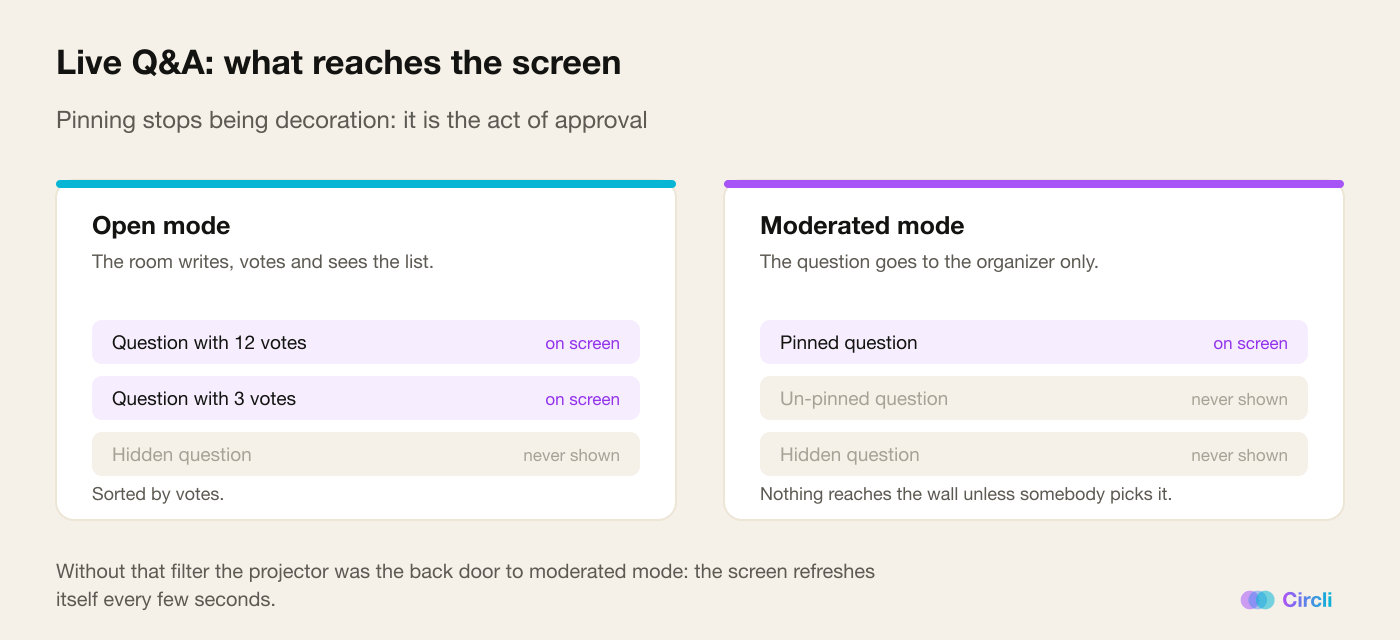
That's what organizer-only mode is for: the attendee writes and their question goes straight to the team. No list, no votes, nothing public.
And here is the detail we learned the most from. When we built that mode, the projector became the back door: the screen refreshes itself every few seconds, so it kept showing everything that came in — including what moderated mode had promised to keep private.
The fix was to make the screen show only pinned questions in moderated mode. Pinning stops being decoration and becomes the act of approval: nothing reaches the wall of the room without a person having chosen it by hand.
And because the promise has to be explicit, we tell the attendee before they type: their questions go to the organizer and to whoever is moderating, and if one gets picked, it may be projected with their name on it. We'd rather they knew before writing than after seeing themselves on the screen.
The details you notice in a full room
- The rate limit is per person, never per IP. In a conference room, hundreds of phones share the same way out to the internet: limiting by IP would punish the whole room because of one person. Everybody gets their own quota.
- The text field is 16 pixels on purpose. Below that size, iPhone zooms in automatically when the field gets focus — and this gets typed mid-talk, with the speaker speaking. An unexpected zoom right there is enough for somebody to abandon the question.
- Tapping the vote twice breaks nothing. The counter is proof against hurried fingers and slow connections.
- The projector has no public URL. It shows the names of real people, so it demands the organizer session. There's no link that can be shared by accident.
- Each talk decides whether it takes questions. One panel can have them open and the next one closed, without touching anything global.
Why it changes the event
For the attendee, asking stops having a social cost. No hand to raise, no two hundred people to address, no competing for the microphone. And if their question doesn't make it, they watch it climb with votes: they took part anyway.
For the speaker, the question block stops being a roulette wheel. They reach the last stretch of the panel knowing what the room wants to hear, in order, in writing.
For the organizer, the Q&A goes from the most awkward moment of the programme to the most participatory — and, with the screen, the most watchable. It's one of those features people work out on their own the moment they see the first question appear on the wall.
How to turn it on
It's switched on per event. Once it's on, the block appears in every talk on the agenda, and the organizer decides whether it runs in open mode — with a list and votes — or in moderated mode.
Our advice: open the projector from the very first talk. Live questions have a small and very real network effect: nobody writes the first one. Once the room sees two or three questions on the screen, it starts writing on its own.
Running an event with panels? Discover Circli Events or reach us at events.circli.app.