QR check-in: run the door of your event without printing anything
The 9am line is your event's first impression. We shipped QR check-in: any phone is a scanner, and there is nothing to print.
There's a moment in every event that no brochure ever shows: quarter to nine in the morning, the door, and forty people standing around while someone hunts for a last name on a printed spreadsheet.
That line is your event's first impression. Before the coffee, before the opening talk, before the stage that took so much work to build. And it's almost always the worst part of the day.
The pain: the door is a bottleneck with two faces
For the organizer, check-in is a logistics problem that always gets underestimated. You have to print badges for people who may never show up. You need a list, and that list has been out of date since the day before. You need trained staff, and that staff can't make mistakes. And at the end of the day, when someone asks how many people actually came, the answer gets built by counting ticket stubs.
Worse still: to know who came in, plenty of organizers end up giving a volunteer at the door access to the full attendee list — with everyone's phone numbers and emails inside it. It's the obvious solution and it's a privacy problem waiting to happen.
For the attendee, the line is a second registration. They already signed up, they already got an email, they already did the paperwork — and now they have to say who they are all over again, spell out their last name, and wait for someone to find their badge in a box sorted by letter.
Nobody bought a ticket in order to stand in a line. Check-in adds no value: it can only subtract it.
What we shipped: the QR people already have
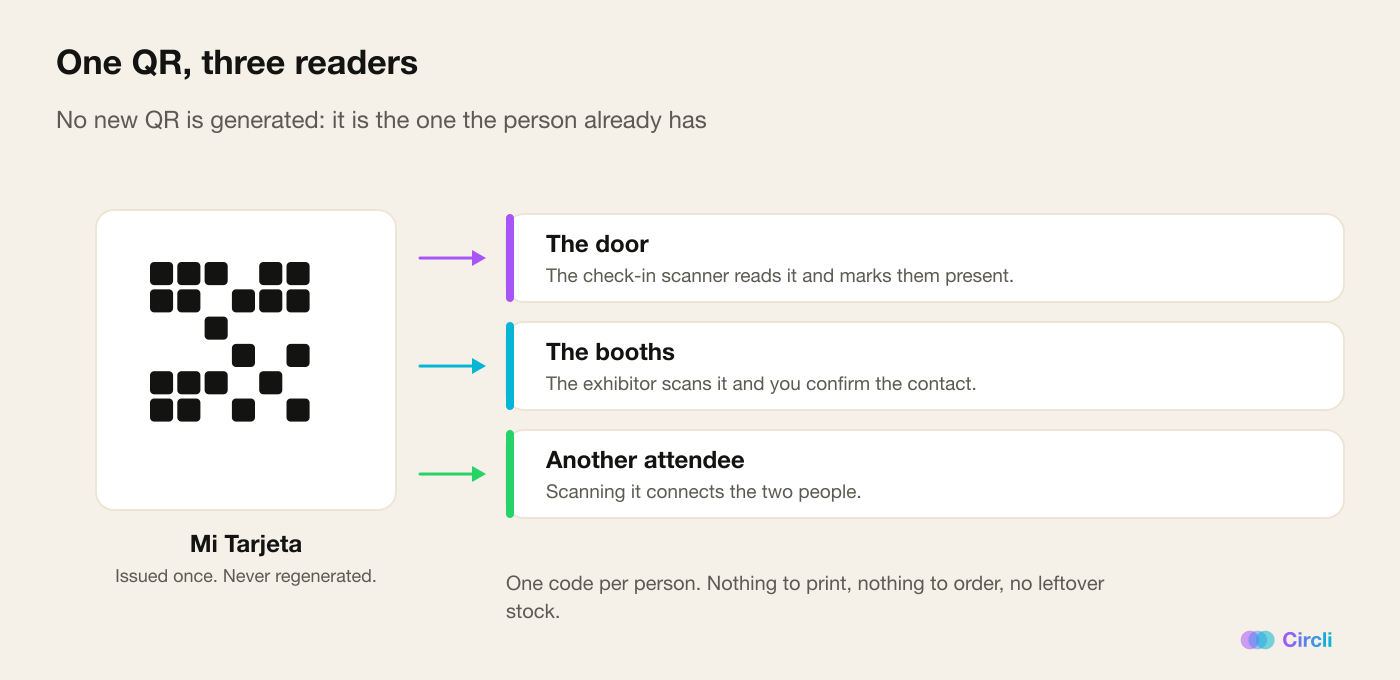
The most important design decision in this feature is the one we did not make: we don't generate a new QR code.
When we shipped Mi Tarjeta and Mi Red — "my card" and "my network" — every attendee ended up with a personal QR code inside the event portal. That same code is now their credential at the door. And if the person registered through the web, the ticket they received by email works too. The scanner recognizes both.
There is nothing new to print and nothing new to generate. No badges to order from a print shop, no leftover stock, no different code for each thing. One QR per person, issued once, never regenerated — and it gets them through the door, connects them to another attendee, and is what the booths read.
On the organizer's side, the reader is any phone. You open the scanner from the panel, point the camera, done. You can put three people on the door with their own phones without buying a single device.
Two modes, and why we tell you the difference
The scanner has two modes, and here we'd rather be honest than salesy.
Standard is the recommended one: you scan, you see the name on screen, you confirm. It adds one tap, and that tap exists for a concrete reason — an attendee's QR can be forwarded in two taps, so looking at the name before confirming is the only thing stopping someone from walking in on a borrowed code. Door security doesn't come from the code: it comes from the person looking at the screen.
Express checks people in the instant it scans, with no confirmation. It's faster, and it's what you want when the line has grown long and the priority is relieving the pressure. But you won't see who you're letting in, and we want you to make that call knowingly, not by default.
The details you notice at nine in the morning
What makes a door tool work isn't the big features. It's the edges.
- Scanning twice breaks nothing. If you scan someone again, it tells you they were already checked in and does not change their original entry time. You can scan away without worrying about duplicates or dirtying the data.
- Search is part of the scanner. If someone's QR won't load —the usual case with people you uploaded from a spreadsheet who never signed up themselves— you look them up by name, email or company on the same screen and check them in with one tap. It's recorded exactly as it would be with the QR. Nobody gets left outside because of a phone with no battery.
- Undo exists. The Undo button reverses a check-in, it gets logged, and if the person comes back in you check them in again, no drama.
- The counter is always in sight. How many checked in out of how many expected, live, without exporting anything or counting stubs.
- The errors speak plain language. "That QR belongs to another event", "That person isn't listed for this event", "They're on the waiting list: their spot isn't confirmed yet". At the door you don't read an error code: you read an instruction.
The permission that separates the door from the database
This is the detail we're proudest of, and it's invisible until you need it.
The Check-in (door) permission is separate from the Attendees permission. You can put a volunteer on check-in without handing them the full list, or the phone numbers, or the export. They do their job —scan, confirm, look up a last name— and nothing else.
It's the difference between trusting someone with a task and handing them the entire database. It should be the industry default; for now it's a checkbox you can tick in Circli.
And one practical decision: the scanner keeps working even when the event is locked for editing. Otherwise a managed event would be left without a door on the day it needs one most.
Why it changes the event
For the attendee, the door stops being paperwork. They arrive, show the phone that was already in their hand, walk in. The event's first impression becomes "that was fast" instead of "what a line".
For the organizer, check-in stops being a cost center and turns into data. You know how many people came in and when, live, with no spreadsheets and no manual counts. And that number —the people who actually showed up, not the ones who registered— is the one that's good for everything afterwards: the sponsor report, sizing next year's catering, and deciding how many doors to open.
How to turn it on
It's a per-event switch in the organizer panel. Once it's on, the scanner appears and the door permission becomes available to assign to your team.
One piece of advice, learned the hard way: publish the portal before the day of the event. The Mi Tarjeta QR arrives together with portal access, so if nobody has received it yet, there'll be nothing to scan at the door. New registrants get it on their own; the ones who were already registered have to be invited. If you reach game day without that done, the search-by-name saves you — but it's a plan B, not the plan.
Running an event and want the nine o'clock line to take two minutes? Discover Circli Events or reach us at events.circli.app.