
En Vivo: live screen trivia and polls, with the room already inside
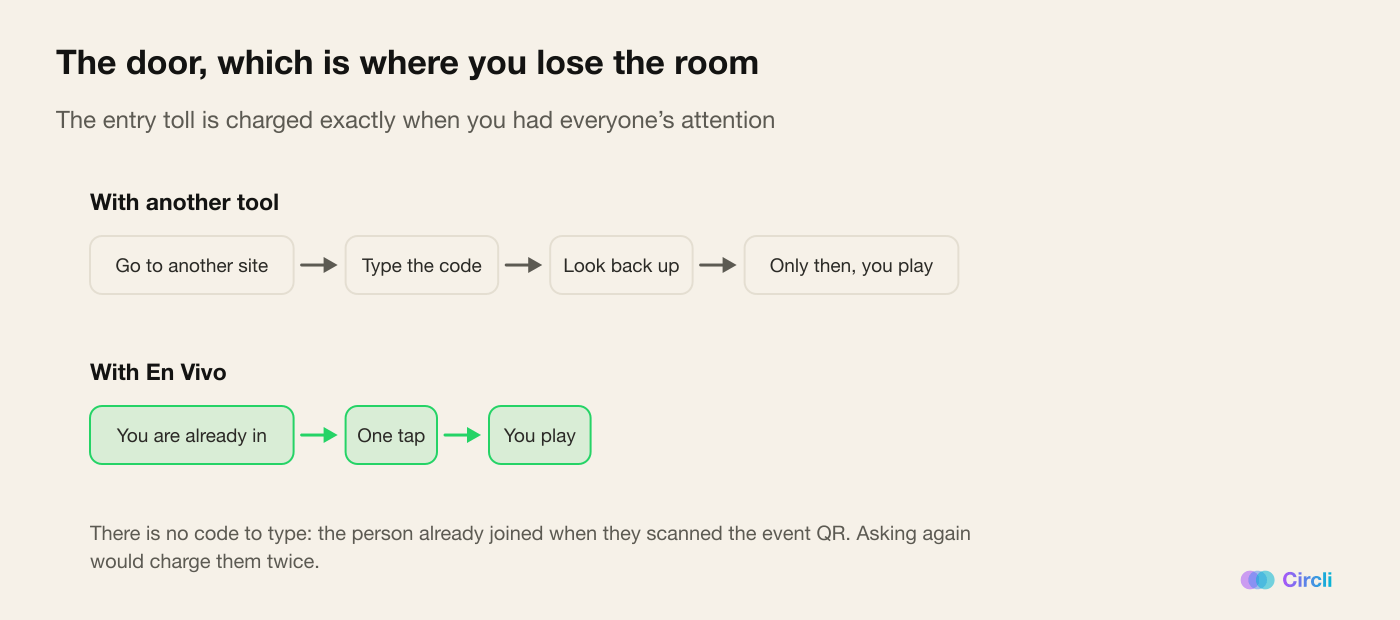
Projecting a trivia normally asks everyone to open another site and type a code. We shipped En Vivo: the room is already inside the event.
You've seen this scene. The speaker says "go to this site and enter code 4471982". The screen shows the code. And the most awkward minute and a half of the event begins: people mistype it, somebody asks whether there's a hyphen, three people put their hands up because it won't load, and by the time half the room is in, the energy that was there has evaporated.
After that it works fine. But the entry toll is always charged, and it's charged at exactly the moment you had everybody's attention.
The pain: the tool is good, the door is bad
For the organizer, hiring a live participation tool means adding another platform, with another account, another link and another sign-up. And it means accepting that a percentage of the room simply won't get in — not out of disinterest, but out of friction.
For the attendee, it's the umpteenth time that day they've been asked to open something new. They're already in the event portal, open on their phone. Being asked now to type a code into another site feels, rightly, like work.
The problem with live participation tools was never the tool. It was that every one of them starts by asking you to come in all over again.
What we shipped: the room is already inside
En Vivo ("live") is trivia, polls and reactions projected on the room's screen — and the attendee's phone is the controller.
The difference is the door: there's no code to type. The person is already inside the event. When the organizer opens the room, three routes appear, and all three are one tap:
- The En Vivo tab in the portal's bar.
- A "Live now" card that rises to the top of the home screen while a session is open, showing how many people are already in.
- The projected QR, for anybody who didn't have the portal open yet.
And when they come in, they're seated automatically: there's no "join" button. They already did the work of joining when they entered the event; asking again would be charging them twice.
What they see is a lobby with the connected count climbing and a one-line instruction: wait for it to start and watch the big screen. They can change the nickname they'll appear under on the leaderboard, and nothing else. Attention has to be on the wall, not on the phone.
Scoring rewards speed, but doesn't punish being wrong
Every question opens with its clock. Answering fast is worth more: it starts at a thousand points and comes down evenly to five hundred as the window closes.
Getting it wrong is worth zero. Never negative.
That's deliberate and it's almost a statement of principle: subtracting points for being wrong teaches people not to play, which is exactly the opposite of what this exists for. In a room of two hundred people, the one who hesitates is the one you gain most from having take part.
And there's a two-second grace for the answer that arrives right at the buzzer. Between the phone showing "0" and the packet reaching the server there is real network latency; without that grace, the last honest answer of every question would be rejected. Latency, besides, is always measured end to end by the server — never by the phone, which could lie.
The right answer doesn't travel early
This is the detail that separates a game that works from one that breaks on day one.
The phone never knows which option is the correct one until the organizer reveals it. Not even after answering: on tapping, the phone doesn't say "correct" or "wrong". It says it sent.
Why? Because if the phone confirmed a correct answer at the instant of the tap, the first person to answer passes the answer to the five people beside them while the clock is still running. A whole row turns into a leak. Confirmation arrives at the reveal, for everybody at the same time.
What's underneath, which is where a full room breaks things
- One single game running at a time, guaranteed by the database and not by a hopeful query. You can leave several sessions in draft — one trivia per talk, for instance — and none of them collide until you try to open the second one.
- The screen and the console refresh every two seconds. The phone listens in real time, with a backup poll in case the room's wifi gets strange.
- Requests are spread out on purpose. When the phase changes, each phone waits a different fraction of a second before asking for data: at the instant of the reveal, an entire room asking at once is a stampede.
- Reactions are validated on both ends. The real-time channel is public, so both the screen and the phone re-check that an emoji is one of the five allowed ones and trim the names. Without that, any attendee could project whatever text they liked on the wall of the room, at a large size.
- Reactions aren't stored. A reaction is worth something while you watch it float up; persisting it would mean writing thousands of rows per session for a three-second animation.
- The code for the live connection travels with us, not from a CDN, because a conference room's wifi blocks more things than you'd expect. If it still doesn't load, the screen degrades to poll refresh and the session carries on.
The panic button
There is a Restart the game button, and it's the feature that gives the most peace of mind when you're about to project something in front of three hundred people.
It clears answers and scores, and leaves the questions untouched. The people connected don't get dropped: dropping them would force the whole room to scan again, which is precisely the disaster you're trying to avoid. The game goes back to the lobby and you start again.
It asks for confirmation and there's no undo, so the warning says so plainly.
Why it changes the event
For the attendee, taking part stops having a toll. No code, no other site, no new account. One tap from where they already were.
For the organizer, it's one tool less to hire and — more importantly — one participation drop-off less. The people who used to get lost at the other platform's door simply come in here.
And there's a room effect we didn't expect: En Vivo points belong to the session and don't touch the booth game standings or the raffle. That makes them light. It's a game, not an obligation — and people play more freely when they know the big prize isn't on the line.
How to turn it on
It's one switch per event in the panel. Then you build the session — up to ten questions, each with its clock — and on the day of the event two windows open: the console, which stays on the operator's computer, and the projector, which gets sent to the big screen.
One tip: leave a session loaded per talk. They're born as drafts and don't reach the screen until you open the one that's due, so you can prepare the whole day in advance and have nothing to write on the day itself.
Running an event and want the room to genuinely take part? Discover Circli Events or reach us at events.circli.app.